
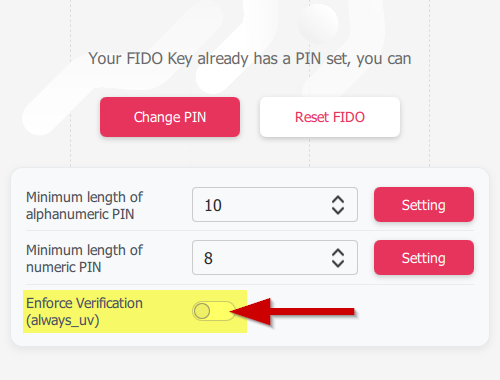
 Token2 R3.3 and later FIDO2 keys enforce user verification by default with always_uv = true, improving security, though some platforms and apps like Windows 10, macOS, and certain legacy clients may fail to handle this override correctly.
FIDO2 security keys support User Verification (UV), which determines whether a user must verify their identity (PIN, biometrics, etc.) before authentication.
The FIDO2 standard defines three main behaviors:
■ Preferred – User verification is requested if available, but not mandatory
■ Discouraged – User verification is avoided, even if available
■ Required – User verification must be performed, otherwise authentication fails
These options allow services to balance security and user convenience depending on their needs.
What Happens When always_uv = true?
FIDO2 authenticators can enforce user verification at the device level using the always_uv setting. When always_uv is set to true, the key always performs user verification, regardless of what the relying party requests.
This means:
■ Even if a service requests discouraged
■ Or simply preferred
■ The key will still require PIN or biometrics
This behavior is fully compliant with the FIDO2 specification, which explicitly allows authenticators to enforce stricter security than requested.
Token2 Keys: Default Behavior from R3.3
Starting with Token2 R3.3, always_uv is enabled by default. This provides stronger security out of the box by ensuring user verification is always performed.
If needed, this setting can be changed using:
■ fido2-manage (command-line utility)
■ Token2 Companion App
Compatibility Issues (Platforms and Applications)
While the FIDO specification allows authenticators to override UV behavior, some platforms and applications do not handle this correctly. Issues have been reported with:
■ Windows 10 (⚠ not recommended for any deployment as it is no longer supported)
■ macOS
■ iOS
■ Some mobile applications using older WebAuthn libraries
In these cases, authentication may fail when always_uv is enabled, even though this behavior is valid and compliant. This appears to be an implementation bug, not a limitation of the FIDO standard. As a workaround, you can disable the always_uv flag, but this is only a temporary measure. The proper solution is for OSes, browsers, and applications to fix their implementations and fully comply with the FIDO specification.
guides
Did you know?
Token2 is offering currently the most secure FIDO2 keys for enterprise customers, known as the PIN+ Series FIDO2 keys. These keys, certified by the FIDO alliance, enforce PIN complexity at the firmware level. This unique feature is not available with other keys, even those marked as FIPS-certified.Subscribe to our mailing list
Want to keep up-to-date with the latest Token2 news, projects and events? Join our mailing list!